Get Files Write and Modified Date using C#

Get File Time [C#]

This example shows how to get file time informations, when any file was created, last modified or accessed. To get file datetime info you can use either static methods of File class or instance methods of FileInfo class.

Get file times using File class

Use File class when you want to get just one specific time, for example if you are only interested in a file last modification time. To do this use static method File.GetLastWri­teTime with file path as a parameter. File class also provides static methods to get file creation time or file last access time. You can also get this times in UTC, e.g. to get file last write time in UTC use File.GetLastWri­teTimeUtc.
[C#]
// local times
DateTime creationTime = File.GetCreationTime(@"c:\file.txt");
DateTime lastWriteTime = File.GetLastWriteTime(@"c:\file.txt");
DateTime lastAccessTime = File.GetLastAccessTime(@"c:\file.txt");

// UTC times
DateTime creationTimeUtc = File.GetCreationTimeUtc(@"c:\file.txt");
DateTime lastWriteTimeUtc = File.GetLastWriteTimeUtc(@"c:\file.txt");
DateTime lastAccessTimeUtc = File.GetLastAccessTimeUtc(@"c:\file.txt");

// write file last modification time (local / UTC)
Console.WriteLine(lastWriteTime);     // 9/30/2007 2:16:04 PM
Console.WriteLine(lastWriteTimeUtc);  // 9/30/2007 6:16:04 PM

Get file times using FileInfo class

Use instance of FileInfo class when you want to get more than one file time or any other informations about the file (like file attributes). Advantage is that you will get all needed informations just in one disk access. See following example.
[C#]
FileInfo fileInfo = new FileInfo(@"c:\file.txt");

// local times
DateTime creationTime = fileInfo.CreationTime;
DateTime lastWriteTime = fileInfo.LastWriteTime;
DateTime lastAccessTime = fileInfo.LastAccessTime;

// UTC times
DateTime creationTimeUtc = fileInfo.CreationTimeUtc;
DateTime lastWriteTimeUtc = fileInfo.LastWriteTimeUtc;
DateTime lastAccessTimeUtc = fileInfo.LastAccessTimeUtc;

// write file last modification time (local / UTC)
Console.WriteLine(lastWriteTime);     // 9/30/2007 2:16:04 PM
Console.WriteLine(lastWriteTimeUtc);  // 9/30/2007 6:16:04 PM

Explain About RANKING Functions – ROW_NUMBER, RANK, DENSE_RANK, NTILE in SQL

I have not written about this subject for long time, as I strongly believe that Book On Line explains this concept very well. SQL Server 2005 has total of 4 ranking function. Ranking functions return a ranking value for each row in a partition. All the ranking functions are non-deterministic.
ROW_NUMBER () OVER ([<partition_by_clause>] <order_by_clause>)
Returns the sequential number of a row within a partition of a result set, starting at 1 for the first row in each partition.
RANK () OVER ([<partition_by_clause>] <order_by_clause>)
Returns the rank of each row within the partition of a result set.
DENSE_RANK () OVER ([<partition_by_clause>] <order_by_clause>)
Returns the rank of rows within the partition of a result set, without any gaps in the ranking.
NTILE (integer_expression) OVER ([<partition_by_clause>] <order_by_clause>)
Distributes the rows in an ordered partition into a specified number of groups.
All the above definition and syntax are taken from BOL. It is difficult to explain above function anything else than what they are explained in BOL. Following example is excellent example from BOL again. This function explains usage of all the four function together in one query.
USE AdventureWorks;
GO
SELECT c.FirstName, c.LastName
,ROW_NUMBER() OVER (
ORDER BY a.PostalCode) AS 'Row Number'
,RANK() OVER (
ORDER BY a.PostalCode) AS 'Rank'
,DENSE_RANK() OVER (
ORDER BY a.PostalCode) AS 'Dense Rank'
,NTILE(4) OVER (
ORDER BY a.PostalCode) AS 'Quartile'
,s.SalesYTD, a.PostalCode
FROM Sales.SalesPerson s
INNER JOIN Person.Contact c
ON s.SalesPersonID = c.ContactID
INNER JOIN Person.Address a
ON a.AddressID = c.ContactID
WHERE TerritoryID IS NOT NULL
AND
SalesYTD <> 0;

Resultset:

Creating MSI or EXE for Asp.Net WebApplication

Steps:
1.Open Visual studio New--> project.
2.Select Setup and deployment in left side and Web Setup Project in right side pane.Select the Location where to create the setup file and give Name to solution.
3.The application will have the bin file under Web Application Folder,here you have to rename bin into bin1.
4.Copy and Paste File that you have published.
5.After data pasted the folder have bin and bin1 ,delete bin1 folder you re-named .
6.Right click the Web Application Folder select the Properties Window.
7.Set Default Document as Application starting Login page ( Login.aspx ).
8.In Solution Explorer Select User interface Editor.
9.In User Interface Editor ,Select add Dialogue in Start.
10.Select Customer information in Add Dialogue Box and click OK.
11.. By default Customer Information will be at last so move above one step.
12.Select property for Customer Information
13.Serial number template are there , we can create number of possibilities of keyword template

Valid editable characters for the SerialNumberTemplate property are:
Char Meaning
# Requires a digit that will not be included in the validation algorithm.
% Requires a digit that will be included in the validation algorithm.
? Requires an alphanumeric character that will not be included in the validation algorithm.
^ Requires an uppercase or lowercase character. Numeric digits are not valid here.
< Any characters to the left of this character will not be visible in the dialog box.
> Any characters to the right of this character will not be visible in the dialog box. Required as a terminator if the < character is used.

Any other character is treated as a literal constant.


For example, setting the SerialNumberTemplate property to "<### - %%%%>" creates two text boxes separated by a dash surrounded by spaces. Validation for the first box (###) simply verifies that the user has entered three digits. The second box (%%%%) is validated by an algorithm that adds the digits together and divides the sum by 7. If the remainder is 0, validation succeeds; otherwise, it fails.
 
Example
                  ????? - %%%%% - ????? - ????? - ?????
 You could still use a mix of numbers and letters in your keys, but the second box would always contain numbers - i.e. "BC45T - 340707 - 1XFFE - EFT22 - 1XYZ3


14.Set Show Serial Number properties to True.
15.Build the Process
16.Go to the Local folder where the project created and copy the .msi Extension file and install the application

NHibernate Example Code in C#.Net

In this article, i will create a simple application that which implements NHibernate, in database side, i will use SQL Server 2008. What is NHibernate ? I will not explain it in there,  there are lot of explanations in the internet, like in here.
You can download latest NHibernate version here.
First, i will create a simple database that have just one table (and i added some record in there):
This is the DDL (Data Definition Language)


create table ACCOUNT (
   ACCID                int         identity(1,1)       not null,
   USERNAME             varchar(50)                     null,
   PASS                 varchar(50)                     null,
   constraint PK_ACCOUNT primary key nonclustered (ACCID)

Hmm.. what does this Identity(1,1)  mean ??? It is mean we will set ACCID attribute, the primary key, to become autonumbered, the value will be added automatically incrementing from 1, 2, 3, … and so on.
Next step, we will create simple solution in Visual Studio 2008 SP1 (remember … to connect to SQL Server 2008, your Visual Studio 2008 must be Service Pack 1 ).

Add some references
  1. NHibernate.dll (NHibernate library)
  2. NHibernate.ByteCode.LinFu.dll (for lazy loading)
  3. System.configuration


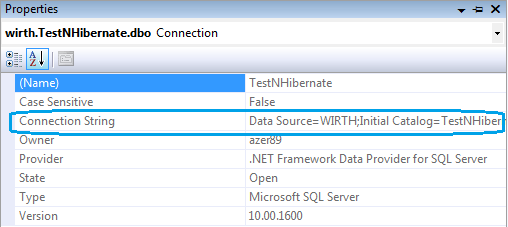
Test your connection with database using Server Explorer


Do not forget to copy the connection string…

For my example, my database connection string is :  ]
Data Source=WIRTH;Initial Catalog=TestNHibernate;User ID=azer89;Password=azer89
Next,  create an App.config file in your project (Just Right click your project, Add, New Item, and Application Configuration File)

Set your App.config like this :


<?xml version="1.0" encoding="utf-8" ?>
<configuration>
  <configSections>
    <section name="hibernate-configuration" type="NHibernate.Cfg.ConfigurationSectionHandler, NHibernate" />
  </configSections>
  <hibernate-configuration xmlns="urn:nhibernate-configuration-2.2">
    <session-factory>
      <property name="connection.provider">NHibernate.Connection.DriverConnectionProvider</property>
      <property name="connection.driver_class">NHibernate.Driver.SqlClientDriver</property>
      <property name="connection.connection_string">Data Source=WIRTH;Initial Catalog=TestNHibernate;User ID=azer89;Password=azer89</property>
      <property name="dialect">NHibernate.Dialect.MsSql2008Dialect</property>
      <property name="proxyfactory.factory_class">NHibernate.ByteCode.LinFu.ProxyFactoryFactory, NHibernate.ByteCode.LinFu</property>
      <mapping assembly="NHibernateTest"/>
    </session-factory>
  </hibernate-configuration>
</configuration>
You must pay attention in property connection.connection_string and dialect in code above. Add a model class similar to Account Table, the fields should be similar too

Your Account.cs should be like this :


using System;
using System.Collections.Generic;
using System.Linq;
using System.Text;
 
namespace NHibernateTest
{
    class Account
    {
        private int accId;
        private string username;
        private string pass;
 
        public virtual int AccId
        {
            get { return accId; }
            set { accId = value; }
        }
 
        public virtual string UserName
        {
            get { return username; }
            set { username = value; }
        }
 
        public virtual string Pass
        {
            get { return pass; }
            set { pass = value; }
        }
    }
}
After creating Account class, we will create map to Account Table using XML file, so NHibernate will know that Account class in application will map to Account Table in database. The XML filename will be “Account.nbm.xml”


<?xml version="1.0" encoding="utf-8" ?>
<hibernate-mapping xmlns="urn:nhibernate-mapping-2.2" namespace="NHibernateTest" assembly="NHibernateTest">
  <class name="Account" table="ACCOUNT" lazy="false">
    <id name="AccId">
      <column name="ACCID"/>
      <generator class="native"/>
    </id>
    <property name="UserName">
      <column name="username"/>
    </property>
    <property name="Pass">
      <column name="pass"/>
    </property>
  </class>
</hibernate-mapping>
Look at generator class, the value is “native”, it is because we have set ACCID column to autoincrement. Oh yeah, Build Action for hbm.xml file must be “Embedded Resource”

Next step is to create persistence class, we will name it NHibernateHelper.cs


using System.Reflection;
using NHibernate;
using NHibernate.Cfg;
 
namespace NHibernateTest
{
    public sealed class NHibernateHelper
    {
        private static ISessionFactory SessionFactory;
 
        private static void OpenSession()
        {
            Configuration configuration = new Configuration();
            configuration.AddAssembly(Assembly.GetCallingAssembly());
            SessionFactory = configuration.BuildSessionFactory();
        }
 
        public static ISession GetCurrentSession()
        {
            if (SessionFactory == null)
                NHibernateHelper.OpenSession();
 
            return SessionFactory.OpenSession();
        }
 
        public static void CloseSessionFactory()
        {
            if (SessionFactory != null)
                SessionFactory.Close();
        }
    }
}
Since ISessionFactory is expensive to be created (it almost take one second in my old computer) we will create one object of ISessionFactory, otherwise with ISession, very cheap to be created, so we can create it very often in your application. We will test the code :


using System;
using System.Collections.Generic;
using System.Linq;
using System.Text;
using NHibernate;
 
namespace NHibernateTest
{
    class Program
    {
        static void Main(string[] args)
        {
            string username = "reza";
            string pass = "reza";
 
            ISession session = NHibernateHelper.GetCurrentSession();
            IQuery query = session.CreateQuery("FROM Account WHERE username = :name  AND pass = :pass ");
            query.SetString("name", username);
            query.SetString("pass", pass);
            IList<Account> acc = query.List<Account>();
            session.Close();
            if (acc.Count == 0)
                Console.WriteLine("Cannot find specified user");
            else
                Console.WriteLine("Found " + acc[0].UserName);
 
            Console.ReadKey();
 
        }
    }
}
It works ! Fine

Linq to SQL is Good or Bad

Linq to Sql: The Good, The Bad & The Bottom Line

I promised my take on Linq to Sql a few days ago. I have spent some time over the past couple days playing with Linq to Sql connected to the AdventureWorks SQL Server sample database.

I have a lot of experience working with NHibernate so you may see some comparisons throughout the post.

Overview

Most everyone who is likely to read this post probably knows what Linq to Sql is. For those that don't, Linq to Sql (and really Linq in general) has been one of the most talked about (Once we found out Linq to Entities wasn't going to ship with Visual Studio 2008) and hyped features of Visual Studio 2008 and the .NET 3.5 framework.

Linq to Sql is actually a big shift for Microsoft. Linq to Sql is Microsoft's first production quality Object Relational Mapper or O/RM for short. They may have tried in the past with products such as ObjectSpaces, but this is the first tool to be released as a completed tool. O/RM tools exist to try and solve the Object-relational impedance mismatch which basically says that most applications are developed in object oriented programming languages these days yet the data which they operate on is typically stored in a relational database. This process of moving data between the objects and relations and vice versa is described as the impedance mismatch. There are obviously many fundamental differences between data stored in a relation and data stored in our objects.

Traditionally Microsoft has endorsed using DataSets to solve this problem. DataSets are essentially a relation based object in your object oriented programming language. Essentially it would allow you to work with your data in your application as relational data. The problem with this? You fail to take advantage of object oriented application design and the advantages it brings to you. Typically these programs have little testability and a significant amount of duplication. As such many O/RM tools became popular (although far less so than if Microsoft had endorsed them) such as NHibernate, LLBLGen Pro, Vanatec OpenAccess, Wilson ORMapper, EntitySpaces, eXpress Persistent Objects and many others (apologies to any I didn't list).

Note that Linq to Sql isn't necessarily a direct competitor to NHibernate or the other above listed O/RM tools for the .NET framework, that is Linq to Entities (AKA ADO.NET Entity Framework). Linq to Sql is more of an introduction to the O/RM world.

The Good

  • The Linq query language itself
The Linq query language is just awesome. It really is a joy when you start to work with it. It can quickly become a pain because it is complex, but then it makes you realize just how powerful it is. I have never seen a query language that is quite so rich. Basic queries are very simple to write and understand, yet it also provides functionality for very complex queries.

Plus, the queries are strongly typed so now there is much less to worry about when refactoring your business objects as compile-time checks are now available for your queries. Note that even with stored procedures, if you change a column in a table referenced by a stored procedure, it won't inform you that you just broke a stored procedure. Likewise stored queries in your applications will not inform you if you change a property name or column either.

For fun see the following blog post: Taking LINQ to Objects to Extremes: A fully LINQified RayTracer. This is not something you woudl actually do, but it does help reinforce just how powerful Linq really is.
  • Better Naming Conventions Than NHibernate
While working with Linq to Sql I felt that the methods on the context were easy to understand and more intuitive than the NHibernate equivalents. For example, when you want to save your changes to your database NHibernate says Flush whereas Linq to Sql uses SubmitChanges. But the big advantages are Linq to Sql's InsertOnSubmit vs NHibernate's Save as well as Attach versus NHibernate's Update or Lock methods.

I can't tell you how many times I've explained how the Save, Update and Lock functionality for NHibernate works. Most people seem to think that they need to call these methods to cause a database operation to take place. They assume Save = Execute Insert NOW, and Update means execute an update NOW! Then they use Flush for good measure because someone told them too. The Linq to Sql naming convention seems to imply that that is not quite what is going on.
  • Simple to Get Started
It didn't take me very long to get up and going with Linq to Sql. While I'm not the biggest fan of the Object Relational Designer, it sure is easy to use and fast to build basic object graphs. Someone who is not familiar with O/RM tools should be able to have objects mapped to database tables in a matter of minutes. This could work very well for simple RAD applications. This process really couldn't be much simpler.
  • Superior Optimistic Concurrency Support
My apologies to any O/RM tools out there that have as good concurrency support as Linq to Sql, I just know I prefer the flexibilty offered by Linq to Sql over NHibernate's. Now, that being said NHibernate's concurrency has always worked fine for me, it's just nice to have additional options.

First, when a ChangeConflictException is thrown it includes a ton of information such as the entity involved, the columns involved and allows your code to recover from it. Linq to Sql will also let you configure if you want to catch all change conflicts or fail as soon as the first conflict is found. These are features, which to my knowledge, NHibernate does not support.

Plus, this is basic but Linq to Sql has native support for SQL Server timestamp columns. This allows you to ensure that you know of all updates even if it occurs outside the scope of Linq to Sql. For some reason NHibernate still does not support this type of column. Instead it rolls its own version column.

Resolving stale data with RefreshMode allows for many options when re-syncing your objects with the database. Again, I just like the options.
  • Superior Stored Procedure Support
If you have a wealth of stored procedures, rest assured they are easy to use from Linq to Sql. Just drag (I do feel dirty using that word) the stored procedure from the server explorer to the methods list in the object relational designer and you will see a new method on your associated context which directly calls that stored procedure. To your code it looks the same as any other method.

Note it is also possible to write your Linq to Sql CRUD through stored procedures. This is also a relatively simple process.

The Bad
  • Very Basic Object Support
This is actually the killer here. Linq to Sql is a very basic O/RM and does not support many of the object oriented concepts sophisticated applications are likely to use. Just a few of the missing features are:
    • No Inheritance
    • No Value based objects (IE NHibernate Components)
    • No Timespan support (A huge problem for the Logistics field I work in)
    • Collections limited to EntitySet (which isn't even a real Set)
      • Where is the Dictionary support at least?
  • No SaveOrUpdate Equivalent
This forces more persistence knowledge to a lower level requiring that all code which associates an object with a context must know if it already exists in the database or not. This basically just adds extra checks in your code which should not be necessary. Sometimes it can seem a bit dirty to check if an object already has a primary key or not yourself, it seems like logic which doesn't belong within the application itself.
  • GUI based Drag & Drop
Yes, I know you can use a seperate mapping file, much like you can with NHibernate, but this isn't realistic. If you don't use the designer, you don't get the code generation. If you don't get the code generation you are responsible for writing all of the many Hooks in your objects that Linq to Sql needs. Folks, these objects are quite dirty. At least with NHibernate your objects are complete persistence ignorant (aka POCO aka Plain Old CLR Object) meaning they look clean and usable for more than just NHibernate. Therefore using anything besides the designer isn't very feasible.

The big problem here though is that your entire object graph needs to live in one diagram and the code behind these objects winds up in a single code file by default. This just isn't acceptable for applications of any size. Diagrams which contain 20-30 objects would be a major pain here, let alone applications that have hundreds. For large applications this just wouldn't fly.
  • Relationships Aren't Interface Based
All of the associations to related objects are handled with EntitySet and EntityRef. Whereas with NHibernate you have the ISet and just the object type you expect. This basically forces the Linq to Sql references on your object, decreasing the ability for unit testing your objects in my opinion. I also don't like the persistence based decencies on my objects.
  • Transaction API is Goofy
For whatever reason you need to handle all explicit transactions outside of the Linq to Sql context. You have to create and the commit it outside the context while supplying the transaction to the context while it is in use. Linq to Sql implicitly uses transactions for all calls to SubmitChanges, but you would think it would be possible to begin new transactions via the context, and then commit or roll them back through the context as well.

The Bottom Line

Really, I have only touched on a brief overview of Linq to Sql here. The important question I ask myself is, "Would I use this framework?". Well, it's a bit of a difficult question. If I was writing a small application which I knew would not grow in to a large one and my object model would be simple enough for the limited object support, yes I would use it. I could get up and going very fast, and I enjoy working with the context interfaces.

However, if I was working on a larger application (really doesn't take much to be too large for what I would do with Linq to Sql), or one which I thought had potential to adjust and grow over time, I would skip Linq to Sql and look for my trusty NHibernate.

So really, it would only be used for a very small subset of problems out there that I would try to solve.

All of that being said, I think Linq to Sql is very important to the .NET development community. Microsoft has historically tried to pretend that O/RM tools didn't exist and to do any development except their DataSets or repetitive patterns was crazy. Now that Microsoft has a framework to endorse it should greatly expand the exposure to such technologies in the .NET development community. I think overall this is a good thing, and will result in overall superior developers.

My only concern with this introduction is that people may get the idea that O/RM tools are nice, and get you up and going fast but fall flat on their face once you try to do anything advanced and then you need to resort to the same tools you used all along. This was actually a very common opinion by people I talked to about NHibernate a few years ago. They had heard of others using O/RM tools (not NHibernate specifically) and how they just don't handle advanced things, they are only good for simple things.

With Linq to Sql I hope developers become exposed to O/RM and become curious about other tools such as NHibernate when Linq to Sql is too simple for what they need instead of grouping all O/RM tools together as being too simple and idealistic.

I'm actually excited about the potential of the .NET development community now that more people will be exposed to O/RM. Long live O/RM tools, you have been lifesavers for me!